


Tool Technology
Tool technology helps you track kit, check settings, and keep site tools working smarter across busy jobs, vans, stores, and handovers.
If you've ever lost half an hour hunting for a missing drill, checking what battery's where, or sorting kit that's been lent out and never seen again, this is the sort of gear that earns its keep. Tool technology is built for trades and site work where control matters, from connected adaptors to app-based tracking and tool settings. It suits firms running multiple users, vans, and battery platforms, and it's a sensible step up from basic kit management. You can also tie it in with everyday More Accessories when you're building out a better site setup.
What Is Tool Technology Used For?
- Tracking tools across vans, stores, and live jobs helps stop expensive kit going missing when teams are moving between first fix, snagging, and maintenance calls.
- Checking tool settings through connected systems makes it easier to match output to the job, whether you're fixing into masonry, drilling repetitive holes, or keeping control on delicate fit-out work.
- Managing batteries and compatible kit on larger sites gives supervisors and users a clearer view of what is charged, assigned, or sat in the wrong gang box.
- Locking down or locating connected tools can save a lot of grief when gear is borrowed across trades and never finds its way back by the end of the shift.
- Running tool technology UK setups across several operatives helps firms keep records tighter, cut downtime, and make better use of the kit they already own.
Choosing the Right Tool Technology
Sort the right setup by matching it to the problem on site. If it will not save time, stop losses, or improve control, do not buy it.
1. Tracking vs Tool Control
If your main issue is tools going missing between vans, stores, and plots, focus on tracking and location features first. If the bigger problem is getting consistent performance from shared kit, look at connected adaptors or systems that let you manage settings and usage.
2. Single User vs Multi User Site
If you work alone or run a small van setup, keep it simple and only buy tool technology that is quick to pair and easy to check on your phone. If you manage several operatives, choose a system that makes assigning, monitoring, and finding tools straightforward without adding admin.
3. Platform Compatibility
Check what tools, batteries, and apps the system actually works with before you spend a penny. There is no point buying smart adaptors or connected accessories if they do not talk properly to the kit already on your shelves and in your vans.
4. Site Conditions and Practicality
If the kit is going onto rough site tools, it needs to put up with dust, knocks, and daily chuck-in-the-van treatment. Fancy features mean nothing if the adaptor is awkward to fit, easy to damage, or gets ignored because it slows the job down.
Who Uses These on Site?
- Sparkies use tool technology to keep tabs on drills, impacts, and test kit moving between vans and plant rooms, especially when several lads are on the same commercial job.
- Site managers and supervisors rate it for keeping control of assigned gear, checking where losses happen, and avoiding the usual arguments over who last had what.
- Facilities and maintenance teams use connected adaptors and tracking kit because their tools are constantly travelling between callouts, stores, and occupied buildings.
- Fitters and installers doing repeat work across plots or units like having settings and kit records easier to manage, rather than relying on memory and marker pen labels.
The Basics: Understanding Tool Technology
Tool technology is really about two things on site: knowing where your kit is and getting more control over how it is used. Here is the simple version.
1. Connected Tracking
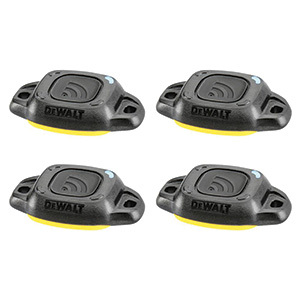
Some tool technology helps you keep tabs on tools through an app or connected system. For site teams, that means less time hunting through vans, stores, and lockups when something should be on the job but is nowhere to be seen.
2. Smart Adaptors and Settings
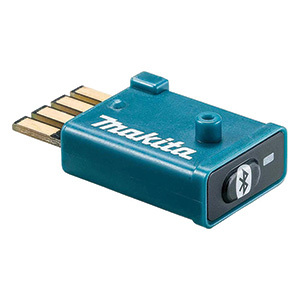
Wireless smart adaptors and connected accessories can link tools to your phone or platform so you can check settings, manage usage, or tie tools into a wider fleet. That matters when several users share the same kit and you need it set right and easy to identify.
3. Better Kit Management
The real benefit is not the tech for its own sake. It is fewer losses, faster checks, and less downtime on site, especially when your tools are spread across jobs, users, and vehicles all week.
Useful Extras for Tool Technology Setups
A smart setup works better when the rest of your kit is organised properly and ready to support it.
1. Spare Batteries and Chargers
If your connected kit relies on battery tools being ready to pair, monitor, or use, dead packs will slow the whole job down. Keep spare batteries and proper charging in rotation so your tracked or connected tools are not sat idle when you need them most.
2. Storage and Labelling Kit
Even the best tool technology will not fix a messy van or site store on its own. Decent storage and clear labelling stop adaptors, tagged tools, and small parts getting mixed up, lost, or left behind at the end of a shift.
3. Core Consumables
Connected tools still need the right cutters and abrasives to do a proper job. It makes sense to keep matching Drill Bits, Saw Blades, and Sanding Pads & Sheets close to hand so the tool you have tracked is actually ready to work.
Choose the Right Tool Technology for the Job
Pick the setup based on what is costing you time or money right now.
| Your Job | Tool Technology Type | Key Features |
|---|---|---|
| Keeping tabs on tools across several vans | Tracking tags or connected location system | Quick identification, app visibility, easy assignment to users or vehicles |
| Managing shared tools on larger sites | Wireless smart adaptors | Tool pairing, usage checks, settings control, clearer ownership records |
| Reducing tool losses in stores and lockups | Connected inventory setup | Fast stock checks, easier audits, less time wasted searching |
| Running repeat fixings or controlled applications | Tool control technology | Consistent settings, better repeatability, less chance of overdoing the job |
Common Buying and Usage Mistakes
- Buying tool technology without checking compatibility first is the usual mistake. If it does not work with your tools, batteries, or app setup, it will end up in the van doing nothing.
- Choosing smart features you do not actually need just adds cost and faff. If all you want is to stop tools going missing, start with tracking rather than a bigger connected system.
- Fitting connected adaptors to shared tools and never setting up clear user ownership defeats the point. Name the tool, assign it properly, and keep the records tidy or no one will trust the system.
- Expecting technology to fix poor storage is another one. If the van, site box, or store is chaos, the tracking helps, but you still need decent organisation to stop wasted time.
- Leaving updates, pairing, or battery checks until the morning of the job is asking for grief. Get everything linked and checked before site starts, not when lads are waiting to crack on.
Tracking Tags vs Wireless Smart Adaptors vs Basic Labelling
Tracking Tags
Best when the main headache is tools going walkabout between jobs, vans, and stores. They help you locate and identify kit, but they do not usually give you much control over how the tool performs.
Wireless Smart Adaptors
Better if you want connected control as well as visibility. These suit firms and trades using compatible systems where tool settings, pairing, and management matter as much as knowing where the tool is.
Basic Labelling
Cheapest and simplest for very small setups, but it only works if everyone puts tools back where they should. Fine for a one man van, not much use once kit starts moving between several operatives and sites.
Maintenance and Care
Keep Contacts and Fittings Clean
Dust, plaster, and site muck can interfere with connected adaptors and fittings. Wipe them down regularly and check connectors are clean before blaming the app or the tool.
Store It Properly
Do not leave small smart accessories loose in the van where they get buried under fixings and hand tools. Keep them in a case or marked compartment so they are not cracked, lost, or forgotten.
Check Pairing and Updates
If the system uses an app or software, keep it updated and make sure tools are still paired properly. A five minute check now saves a lot of standing about on site later.
Inspect for Site Damage
Look for cracked housings, bent clips, or worn fixings after rough transport or a drop. Smart kit is useful, but once the casing or connection point is damaged, it is often quicker to replace than keep fighting it.
Why Shop for Tool Technology at ITS?
If you are looking to buy tool technology for tradesmen, we stock the proper gear to build a workable setup, from connected site solutions through to the wider Power Tool Accessories range that keeps everything moving. It is all held in our own warehouse, in stock, and ready for next day delivery across the UK.
Tool Technology FAQs
What are tool technology used for?
They are used to keep better control of site kit, usually by helping you track tools, manage settings, or link compatible gear through an app or connected system. In plain terms, it cuts time wasted hunting for tools and helps larger teams keep a tighter grip on what is being used where.
How do I choose the right tool technology?
Start with the problem, not the spec sheet. If tools are going missing, focus on tracking. If shared kit needs more control, look at smart adaptors or connected systems. Always check compatibility with your existing tools, batteries, and software before buying.
Are tool technology suitable for trade use?
Yes, provided you pick gear that is meant for real site use and not just light workshop storage. Good tool technology UK setups are useful for trades, maintenance teams, and site managers who need better control over shared tools, vehicles, and stores.
What should I check before buying tool technology?
Check compatibility first, then look at how it fits your working day. Make sure it works with your tool platform, does a job you actually need, and is simple enough that the lads will use it properly instead of bypassing it after a week.
Can I buy tool technology online from ITS?
Yes. You can buy tool technology online UK from ITS, and the range is backed by real warehouse stock rather than vague supplier lead times. If it is showing in stock, you can get it ordered for fast delivery to site, home, or yard.