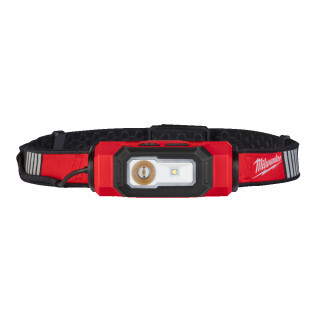





Milwaukee RedLithium USB Torches & Lighting
Working inside a cupboard or checking a dark roof void? A Milwaukee USB torch puts rechargeable light where the job needs it.
Milwaukee REDLITHIUM USB torches and lighting cover handheld inspection, hands-free work and close-range task lighting. Check beam pattern, mounting options and runtime before buying; choose the format that keeps your work lit without tying up a hand.
What Jobs Are Milwaukee USB Torches Best At?
- Inspect pipe joints beneath sinks and behind sanitaryware with a compact handheld torch that puts light into the cupboard rather than across the room.
- Keep both hands free when routing cables through dark lofts by choosing a head torch with a suitable strap and adjustable beam angle.
- Light the inside of an isolated distribution board with a task light positioned securely outside the working area, keeping shadows off terminals and cable markings.
- Check fixings, leaks and damaged components during maintenance rounds without trailing a mains lighting lead between rooms.
- Illuminate plant cupboards and service panels with a flood-style light, using a magnetic mount where the selected model provides one.
Choosing the Right Milwaukee USB Torch
Choose how you need to hold or mount the light first; maximum lumens come second.
1. Handheld, Head Torch or Task Light
If you are checking a fault and moving on, a handheld torch makes sense. If you are terminating cables or fitting pipework, look at Milwaukee REDLITHIUM USB Head Torches instead. Choose a freestanding or mounted task light when one work area needs lighting throughout the job.
2. Beam Pattern and Working Distance
For a cupboard at arm's length, choose a broad beam that lights the whole work area. For inspecting the far end of a roof void, prioritise beam distance. Do not assume every Milwaukee USB flashlight has adjustable focus; check the individual model.
3. Runtime at the Setting You Will Use
Compare runtime on the working mode you actually need, not the longest figure on the box. A long low-mode runtime does not tell you how long maximum output lasts. For repeated shifts, a replaceable battery can be more useful than a higher peak output.
4. Battery Type and Charging Connection
Check whether the light takes a removable REDLITHIUM USB battery or has an integrated battery. USB charging alone does not establish compatibility. Match spare batteries and charging equipment to the exact model within the Milwaukee REDLITHIUM USB system, and check which charging cable is supplied.
Who Uses Milwaukee USB Torches and Lighting?
Sparkies use compact rechargeable lights for inspecting isolated boards, tracing routes and reading cable markings in poorly lit cupboards. Plumbers and maintenance fitters use them beneath units and around plant, while chippies working in roof spaces benefit from a head torch that leaves both hands available for fixing and measuring.
The Basics: Understanding Rechargeable Torch Specifications
Three figures help you judge whether a light will suit the job: output, beam distance and runtime. None tells the whole story on its own.
1. Lumens and Beam Distance
Lumens describe the total visible light output; beam distance indicates how far the beam reaches under specified test conditions. A broad flood can light a service cupboard well without reaching as far as a concentrated inspection beam.
2. Output Modes and Runtime
Higher output uses the battery faster. Lower modes can reduce glare from white panels and extend working time, so a useful low setting matters as much as maximum brightness for close inspection.
3. Ingress Protection
The IP rating describes tested protection against solids and water. Splash resistance is not permission to submerge a torch, and charging-port covers must be secured as instructed to maintain the stated protection.
Accessories to Keep Your Milwaukee USB Light Working
Match these extras to the exact light so a flat battery or missing charging lead does not stop the job.
1. Compatible Spare REDLITHIUM USB Battery
For models with a removable battery, a charged spare lets you carry on instead of waiting beside a socket. Check battery compatibility first; an integrated-battery pen light cannot use a loose replacement pack.
2. Compatible External Battery Charger
A separate charger for a compatible removable battery lets you charge one pack while another powers the light. This is useful when the torch stays in use throughout a maintenance shift.
3. Correct USB Lead and Power Supply
Keep a matching lead and suitable USB supply with the kit rather than relying on whatever is in the van. Check the port type and required input; the wrong connection will not fit, and an inadequate supply can slow charging.
Choose the Right Milwaukee USB Torch for the Job
Match the light format to your working position and the area you need to see.
| Your Job | Light Type | Key Features |
|---|---|---|
| Quick checks behind units and inside service panels | Compact handheld or pocket torch | Accessible controls, suitable beam distance and a secure carry clip where fitted. |
| Cable routing and fixing in dark roof spaces | USB head torch | Adjustable angle, useful flood mode and runtime suited to the shift. |
| Repairs inside plant cupboards | Pivoting or flood-style task light | Stable positioning and a compatible magnetic or hanging mount where provided. |
| Lighting a fixed bench or maintenance area | Compact USB site light | Broad coverage, practical mounting and sufficient runtime at the required output. |
Common Buying and Usage Mistakes
- Buying on maximum lumens alone can leave you with glare at close range and less runtime than expected. Check the lower modes and beam pattern against your normal working distance.
- Assuming every Milwaukee rechargeable torch uses the same battery can leave you with an incompatible spare. Confirm whether the exact light has a removable REDLITHIUM USB battery or an integrated cell.
- Choosing a handheld light for a two-handed job means repeatedly putting it down and losing the beam. Pick a head torch or a task light with a suitable mounting arrangement.
- Treating splash resistance as waterproofing risks water damage. Follow the stated IP rating and never connect charging equipment to a wet port.
USB Handheld Torches vs USB Task Lights vs M12 Lighting
USB Handheld Torches
Choose a handheld for quick inspections, directed light and easy carrying between jobs. It is less convenient when both hands are occupied unless the model has suitable mounting. Browse Milwaukee Torches if you need to compare handheld formats across the wider range.
USB Task and Site Lights
Choose these for lighting a work area rather than directing a narrow inspection beam. Milwaukee REDLITHIUM USB Site Lights suit compact maintenance setups, but check coverage and mounting before expecting one small light to illuminate a whole room.
M12 Torches and Lighting
Consider Milwaukee M12 Torches & Lighting if you already carry M12 batteries or need a larger lighting format. The trade-off can be extra size and weight. M12 batteries are not interchangeable with REDLITHIUM USB batteries.
Maintenance and Care
Keep the Lens Clear
Wipe away dust and grime with a soft cloth. Abrasives and aggressive solvents can damage the lens or housing; do not scrape dried plaster off with a blade.
Check Ports and Battery Contacts
Inspect the charging socket, cover and accessible battery contacts for dirt or damage. Let wet equipment dry fully before charging, and do not force a plug into a blocked socket.
Inspect Mounts and Straps
Check clips, pivots, headbands and mounting points before use. A cracked clip or loose pivot needs attention before the light is relied on above a finished surface or machinery.
Store and Charge Sensibly
Keep the light away from loose fixings, damp kit and excessive heat. Follow the specified charging temperature range, and stop using a battery that is swollen, leaking or physically damaged.
Your Milwaukee USB Torches and Lighting Range, Ready to Go
ITS stocks the full Milwaukee USB torches and lighting range, covering handheld inspection lights, head torches and compact task lighting. Stock is held in our own warehouse, ready for next-day delivery. Check the individual listing for current availability, included batteries and charging equipment before ordering.
Milwaukee USB Torch FAQs
How bright is a Milwaukee USB torch?
Output depends on the model and selected mode, with some REDLITHIUM USB torches reaching 1,100 lumens. Check the individual specification rather than treating that as standard across the range. For close electrical or plumbing work, a broad beam and usable low setting can matter more than maximum output.
How long does a Milwaukee USB torch run?
There is no single runtime across the range. It depends on the model, battery capacity and output setting, with high mode running for less time than low mode. Compare the published runtime for the setting you need, and allow for battery age and cold conditions.
Is the Milwaukee USB torch waterproof?
Do not assume it is. Water protection varies by model, and a splash-resistant rating does not cover immersion. Check the stated IP rating, secure any port covers as instructed and make sure the charging connection is dry before plugging it in.
Does the Milwaukee USB torch have a clip?
Some handheld and pocket models have a carry clip, but it is not standard on every light. Check the product details and pictures for clip position and attachment options. A pocket clip is not automatically an approved attachment for working at height.
Can you replace the battery in a Milwaukee USB torch?
A Milwaukee REDLITHIUM USB torch designed with a removable battery allows you to swap in a compatible pack. Other USB-rechargeable models can have integrated batteries that are not user-replaceable. Check the exact model before ordering a spare, and do not try to open a sealed battery housing.
Do Milwaukee USB torches have a focus beam?
Selected handheld models offer adjustable spot-to-flood focusing; others use fixed beams or separate lighting modes. An adjustable head angle is not the same as adjustable focus. Look specifically for a focusing feature if you need to switch between close work and longer-distance inspection.
How long does a Milwaukee USB torch take to charge?
Charging time varies with the battery, light and power supply, so use the figure specified for the exact model and charging arrangement. A quoted partial-charge time is not a full-charge time. If downtime matters, choose a removable-battery model and keep a compatible spare charged.
Is a USB torch good for electricians?
Yes, for inspecting isolated boards, reading cable markings and lighting cupboards or roof spaces. Choose hands-free mounting when you need both hands on the job. A standard USB torch is not an insulated tool or an intrinsically safe light; hazardous areas require equipment approved for that environment.